Access Control
Concepts
ReductStore provides straightforward access management based on token authentication and permissions.
Token Authentication
ReductStore uses token-based authentication to secure the HTTP API. A client must send a valid token in the Authorization header in order to access it.
A ReductStore instance must have an initial token to enable authentication and access management. The token is named init-token and has full access permissions.
For standalone, primary, and secondary instances, explicitly choose one authentication mode at startup:
| Setting | Behavior |
|---|---|
RS_API_TOKEN | Provisions init-token with the configured value on every startup. This token cannot be rotated or removed through the API. |
RS_INIT_API_TOKEN | Initializes a manageable init-token. After startup, the token can be rotated or removed through the API like other tokens. |
RS_DISABLE_AUTH | Set to true to run without authentication. Requests are allowed without a token. |
Set exactly one of RS_API_TOKEN or RS_INIT_API_TOKEN when authentication is enabled. The server rejects configurations where both or neither are set. If RS_DISABLE_AUTH=true, the token variables are ignored.
When RS_INIT_API_TOKEN is used, its value initializes init-token on the first startup. A value already stored for that token, including one created by rotation, is preserved on later restarts. If init-token is removed, the environment variable recreates it on the next restart.
Tokens are identified by name and have a set of permissions. The token value (secret) is generated by the server and is returned only when the token is created or rotated. Store it securely; it cannot be retrieved later.
If you need to change a token's permissions, create a new token. If you only need to replace the secret value (for example, after an accidental leak), rotate the token value without changing the token name or permissions. See Rotate a Token for the HTTP API.
Disabling authentication exposes all data and administrative operations without access control. Use RS_DISABLE_AUTH=true only in trusted environments.
Permissions and Access Control
Each token has a set of permissions that define what actions can be performed with the token:
-
full_access: Allows a client to perform any action on the API without any restrictions. -
read: Allows a client to read data from specific buckets. The list of buckets that can be accessed for reading is defined when the token is created. -
write: Allows a client to write data to specific buckets, which includes adding new entries or deleting existing ones. The list of buckets that can be accessed for writing is defined when the token is created.
The table below shows the list of operations that can be performed for different permissions:
| Operation | Anonymous | No permissions | Read | Write | Full Access |
|---|---|---|---|---|---|
| Alive check | ✅ | ✅ | ✅ | ✅ | ✅ |
| Server Status | ❌ | ✅ | ✅ | ✅ | ✅ |
| List Buckets | ❌ | ❌ | ✅ | ❌ | ✅ |
| Get Bucket | ❌ | ❌ | ✅ | ❌ | ✅ |
| Create Bucket | ❌ | ❌ | ❌ | ❌ | ✅ |
| Update Bucket Settings | ❌ | ❌ | ❌ | ❌ | ✅ |
| Rename Bucket | ❌ | ❌ | ❌ | ❌ | ✅ |
| Remove Bucket | ❌ | ❌ | ❌ | ❌ | ✅ |
| Read Data | ❌ | ❌ | ✅ | ❌ | ✅ |
| Update Data | ❌ | ❌ | ❌ | ✅ | ✅ |
| Write Data | ❌ | ❌ | ❌ | ✅ | ✅ |
| Rename Entry | ❌ | ❌ | ❌ | ✅ | ✅ |
| Remove Entry | ❌ | ❌ | ❌ | ✅ | ✅ |
| Manage Tokens | ❌ | ❌ | ❌ | ❌ | ✅ |
| Manage Replication Tasks | ❌ | ❌ | ❌ | ❌ | ✅ |
| Access System Events | ❌ | ❌ | ✅ | ✅ | ✅ |
Anonymous refers to clients that don't send an access token in the Authorization header.
Managing Tokens
Here you will find examples of how to create, browse, retrieve, and delete access tokens using the ReductStore SDKs, REST API, CLI and Web Console.
Note that all the examples are written for a local ReductStore instance available at http://127.0.0.1:8383 with the API token my-token.
For more information on setting up a local ReductStore instance, see the Getting Started guide.
Creating a Token
An access token can be created using the SDKs, CLI client, Web Console, or REST API. The token name must be unique within the store, and a client must have full access permission. You can also provision a token using environment variables. See the examples below:
- CLI
- Web Console
- Python
- JavaScript
- Go
- Rust
- C++
- cURL
- Provisioning
reduct-cli alias add local -L http://localhost:8383 -t "my-token"
reduct-cli token create local/new-token --read-bucket "example-bucket" --write-bucket "example-bucket"
Steps to create a new access token using the Web Console:
- Open the Web Console at
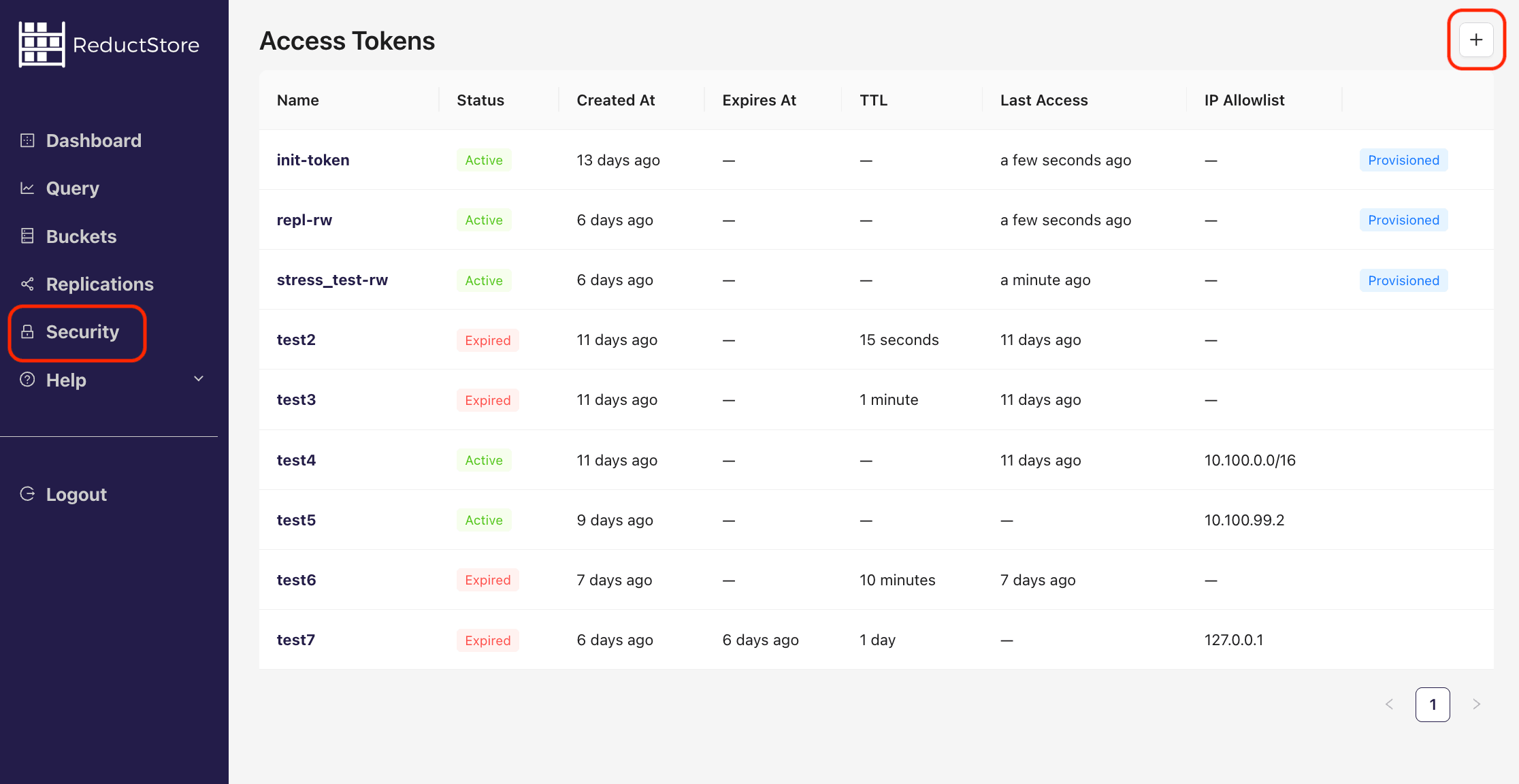
http://127.0.0.1:8383in your browser. - Click on the "Security" tab in the left sidebar.
- Click on the plus icon in the top right corner to create a new token:
- Fill in the token name and select the permissions for the token:
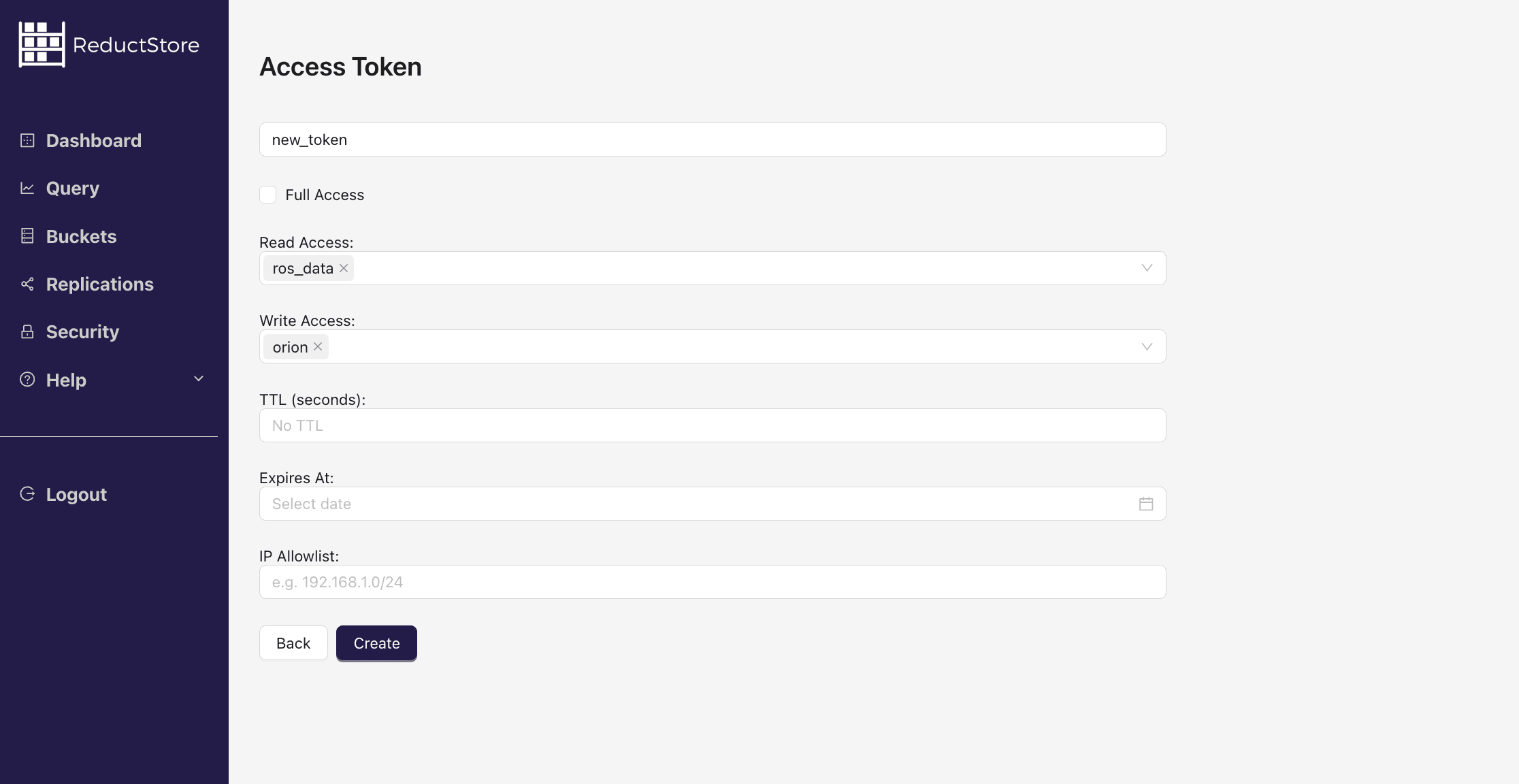
- Click on the "Create" button to create the token.
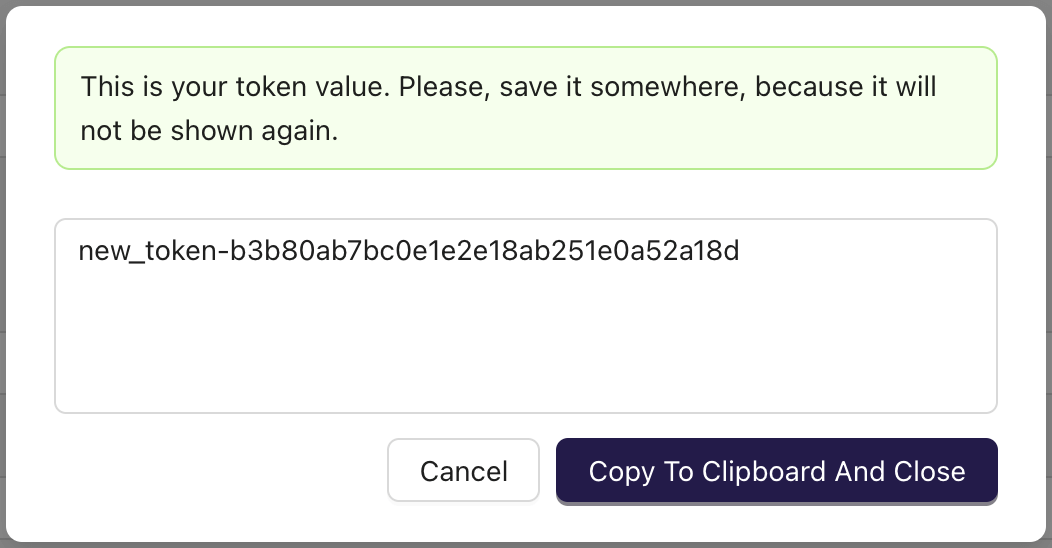
- Copy the token value and save it in a secure place.
from reduct import Client, Permissions


async def create_token():
    # Create a client with the base URL and API token
    async with Client("http://localhost:8383", api_token="my-token") as client:
        # Create a token with read/write access, a 1 hour inactivity TTL,
        # and an IP allowlist for local access.
        permissions = Permissions(
            full_access=False,
            read=["example-bucket"],
            write=["example-bucket"],
        )
        token = await client.create_token(
            "new-token",
            permissions,
            ttl=3600,
            ip_allowlist=["127.0.0.1", "::1"],
        )
        print(f"generated token: {token}")


if __name__ == "__main__":
    import asyncio

    asyncio.run(create_token())
import { Client } from "reduct-js";

// Create a new client with the server URL and an API token
const client = new Client("http://127.0.0.1:8383", { apiToken: "my-token" });

// Create a token with read/write access, a 1 hour inactivity TTL,
// and an IP allowlist for local access.
const token = await client.createToken("new-token", {
  permissions: {
    fullAccess: false,
    read: ["example-bucket"],
    write: ["example-bucket"],
  },
  ttl: 3600,
  ipAllowlist: ["127.0.0.1", "::1"],
});

console.log(`Generated token: ${token}`);
package main

import (
	"context"
	reduct "github.com/reductstore/reduct-go"
	model "github.com/reductstore/reduct-go/model"
)

func main() {
	// Create a client and use the base URL and API token
	client := reduct.NewClient("http://localhost:8383", reduct.ClientOptions{
		APIToken: "my-token",
	})

	// Create a token with read/write access, a 1 hour inactivity TTL,
	// and an IP allowlist for local access.
	permissions := model.TokenPermissions{
		FullAccess: false,
		Read:       []string{"example-bucket"},
		Write:      []string{"example-bucket"},
	}

	ttl := uint64(3600)
	createResp, err := client.CreateTokenWithOptions(context.Background(), "new-token", model.TokenCreateOptions{
		Permissions: permissions,
		TTL:         &ttl,
		IPAllowlist: []string{"127.0.0.1", "::1"},
	})
	if err != nil {
		panic(err)
	}

	// Print the generated token
	println("generated token:", createResp.Value)
}
use reduct_rs::{Permissions, ReductClient, ReductError};
use tokio;

#[tokio::main]
async fn main() -> Result<(), ReductError> {
    // Create a new client with the API URL and API token
    let client = ReductClient::builder()
        .url("http://127.0.0.1:8383")
        .api_token("my-token")
        .build();

    // Create a token with read/write access.
    let permissions = Permissions {
        full_access: false,
        read: vec![String::from("example-bucket")],
        write: vec![String::from("example-bucket")],
    };

    let token = client.create_token("new-token", permissions).await?;

    println!("Generated token: {}", token);
    Ok(())
}
#include <reduct/client.h>
#include <cassert>
#include <chrono>
#include <iostream>

using reduct::IClient;
using reduct::Error;

int main() {
    // Create a client with the server URL
    auto client = IClient::Build("http://127.0.0.1:8383", {
            .api_token = "my-token"
    });

    // Create a token with read/write access, a 1 hour inactivity TTL,
    // an absolute expiration time, and an IP allowlist for local access.
    auto [token, create_err] = client->CreateToken("new-token", IClient::TokenCreateRequest{
            .permissions = {
                .full_access = false,
                .read = {"example-bucket"},
                .write = {"example-bucket"},
            },
            .expires_at = std::chrono::system_clock::now() + std::chrono::hours(24),
            .ttl = 3600,
            .ip_allowlist = {"127.0.0.1", "::1"},
    });

    assert(create_err == Error::kOk);
    std::cout << "Generated token: " << token << std::endl;
    return 0;
}
#!/bin/bash
set -e -x

API_PATH="http://127.0.0.1:8383/api/v1"
AUTH_HEADER="Authorization: Bearer my-token"

# Create a token with read/write access, a 1 hour inactivity TTL,
# and an IP allowlist for local access.
curl -X POST -H "$AUTH_HEADER"  -d '{
  "permissions": {
    "full_access": false,
    "read": ["example-bucket"],
    "write": ["example-bucket"]
  },
  "ttl": 3600,
  "ip_allowlist": ["127.0.0.1", "::1"]
}' "$API_PATH/tokens/new-token"
version: "3"
services:
  reductstore:
    image: reduct/store:latest
    ports:
      - "8383:8383"
    volumes:
      - ./data:/data
    environment:
      - RS_API_TOKEN=my-api-token
      - RS_TOKEN_1_NAME=new-token
      - RS_TOKEN_1_VALUE=keep-it-secret
      - RS_TOKEN_1_FULL_ACCESS=false
      - RS_TOKEN_1_READ=example-bucket
      - RS_TOKEN_1_WRITE=example-bucket
      - RS_TOKEN_1_EXPIRES_AT=2030-01-01T00:00:00Z
The token value is generated when the token is created and is only available at that time.
Browsing Tokens
You can list all the access tokens available in the store using the SDKs, CLI client, Web Console, or REST API. The client must have full access permission. See the examples below:
- CLI
- Web Console
- Python
- JavaScript
- Go
- Rust
- C++
- cURL
reduct-cli alias add local -L http://localhost:8383 -t "my-token"
reduct-cli token ls local
reduct-cli token show local/init-token
Steps to browse access tokens using the Web Console:
- Open the Web Console at
http://127.0.0.1:8383in your browser. - Click on the "Security" tab in the left sidebar.
- You will see the list of access tokens:
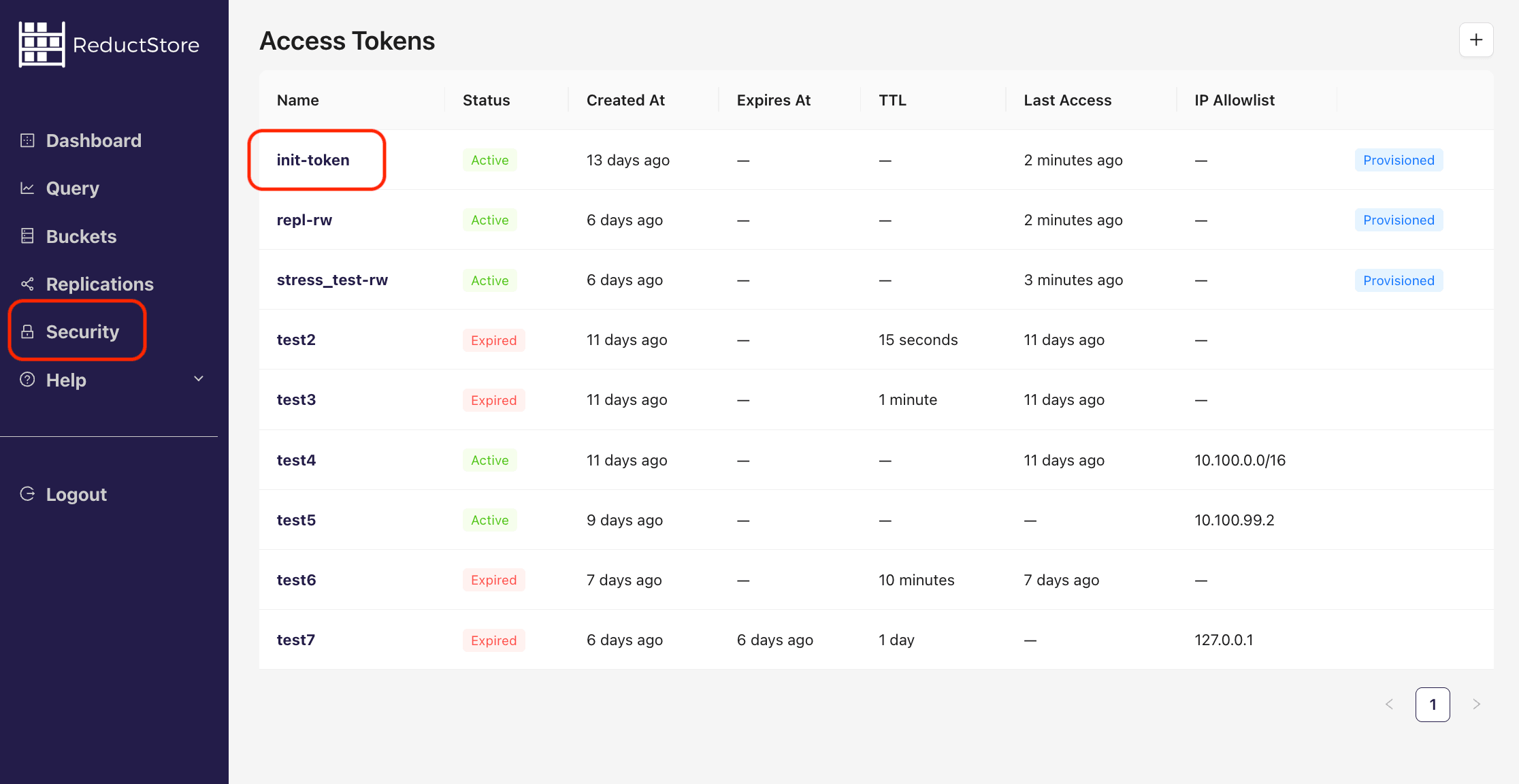
- Click on the token name to view the token details
from typing import List

from reduct import Client, Permissions, Token, FullTokenInfo


async def browse_tokens():
    # Create a client with the base URL and API token
    async with Client("http://localhost:8383", api_token="my-token") as client:
        #  Browse all tokens and print their information
        tokens: List[Token] = await client.get_token_list()
        for token in tokens:
            print(f"Token: {token.name}")
            print(f"Created: {token.created_at}")
            print(f"Provisioned: {token.is_provisioned}")

            # Get detailed information about a specific token
            details: FullTokenInfo = await client.get_token(token.name)
            print(f"Permissions: {details.permissions}")


if __name__ == "__main__":
    import asyncio

    asyncio.run(browse_tokens())
import { Client } from "reduct-js";

// Create a new client with the server URL and an API token
const client = new Client("http://127.0.0.1:8383", { apiToken: "my-token" });

// Browse all tokens and print their information
const tokenList = await client.getTokenList();
for (const token of tokenList) {
  console.log(`Token: ${token.name}`);
  console.log(`Created: ${token.createdAt}`);
  console.log(`Provisioned: ${token.isProvisioned}`);

  // Get detailed information about a specific token
  const tokenInfo = await client.getToken(token.name);
  console.log(`Permissions: ${tokenInfo.permissions}`);
}
package main

import (
	"context"
	reduct "github.com/reductstore/reduct-go"
)

func main() {
	// Create a client and use the base URL and API token
	client := reduct.NewClient("http://localhost:8383", reduct.ClientOptions{
		APIToken: "my-token",
	})
	// Browse all tokens and print their information
	tokens, err := client.GetTokens(context.Background())
	if err != nil {
		panic(err)

	}

	for _, token := range tokens {
		println("Token:", token.Name)
		println("Created:", token.CreatedAt)
		println("Provisioned:", token.IsProvisioned)

		// Get detailed information about a specific token
		details, err := client.GetToken(context.Background(), token.Name)
		if err != nil {
			panic(err)
		}
		println("Permissions:", details.Permissions)
	}
}
use reduct_rs::{ReductClient, ReductError};
use tokio;

#[tokio::main]
async fn main() -> Result<(), ReductError> {
    // Create a new client with the API URL and API token
    let client = ReductClient::builder()
        .url("http://127.0.0.1:8383")
        .api_token("my-token")
        .build();

    // Browse all tokens and print their information
    let tokens = client.list_tokens().await?;
    for token in tokens {
        println!("Token: {}", token.name);
        println!("Created: {:?}", token.created_at);
        println!("Provisioned: {:?}", token.is_provisioned);

        // Get detailed information about the token
        let token = client.get_token(&token.name).await?;
        println!("Permissions: {:?}", token.permissions);
    }

    Ok(())
}
#include <reduct/client.h>
#include <iostream>
#include <cassert>

using reduct::IBucket;
using reduct::IClient;
using reduct::Error;

std::string PrintTime(std::chrono::system_clock::time_point time) {
    auto now_time_t = std::chrono::system_clock::to_time_t(time);
    auto now_tm = std::localtime(&now_time_t);
    char buf[32];
    std::strftime(buf, sizeof(buf), "%Y-%m-%d %H:%M:%S", now_tm);
    return buf;
}

std::ostream &operator<<(std::ostream &os, const std::vector<std::string> &v) {
    os << "[";
    for (size_t i = 0; i < v.size(); ++i) {
        os << v[i];
        if (i != v.size() - 1) {
            os << ", ";
        }
    }
    os << "]";
    return os;
}

int main() {
    // Create a client with the server URL
    auto client = IClient::Build("http://127.0.0.1:8383", {
            .api_token = "my-token"
    });

    // Browse all tokens and print their information
    auto [list, list_err] = client->GetTokenList();
    assert(list_err == Error::kOk);

    for (const auto &token: list) {
        std::cout << "Token: " << token.name << std::endl;
        std::cout << "Created: " << PrintTime(token.created_at) << std::endl;

        // Get detailed information about a specific token
        auto [token_info, get_err] = client->GetToken(token.name);
        assert(get_err == Error::kOk);

        std::cout << "Full Access: " << token_info.permissions.full_access << std::endl;
        std::cout << "Read Access: " << token_info.permissions.read << std::endl;
        std::cout << "Write Access: " << token_info.permissions.write << std::endl;
    }
    return 0;
}
#!/bin/bash
set -e -x

API_PATH="http://127.0.0.1:8383/api/v1"
AUTH_HEADER="Authorization: Bearer my-token"

# Browse all tokens and print their information
curl -H "$AUTH_HEADER" "$API_PATH/tokens"

# Get detailed information about a specific token
curl -H "$AUTH_HEADER" "$API_PATH/tokens/my-token"
Removing a Token
You can remove an access token using the SDKs, CLI client, Web Console, or REST API. The token name must exist in the store, and a client must have full access permission. Refer to the following examples:
- CLI
- Web Console
- Python
- JavaScript
- Go
- Rust
- C++
- cURL
reduct-cli alias add local -L http://localhost:8383 -t "my-token"
reduct-cli token rm local/token-to-remove --yes
Steps to remove an access token using the Web Console:
- Open the Web Console at
http://127.0.0.1:8383in your browser. - Click on the "Security" tab in the left sidebar.
- You will see the list of access tokens:
- Click on the token name to view the token details:
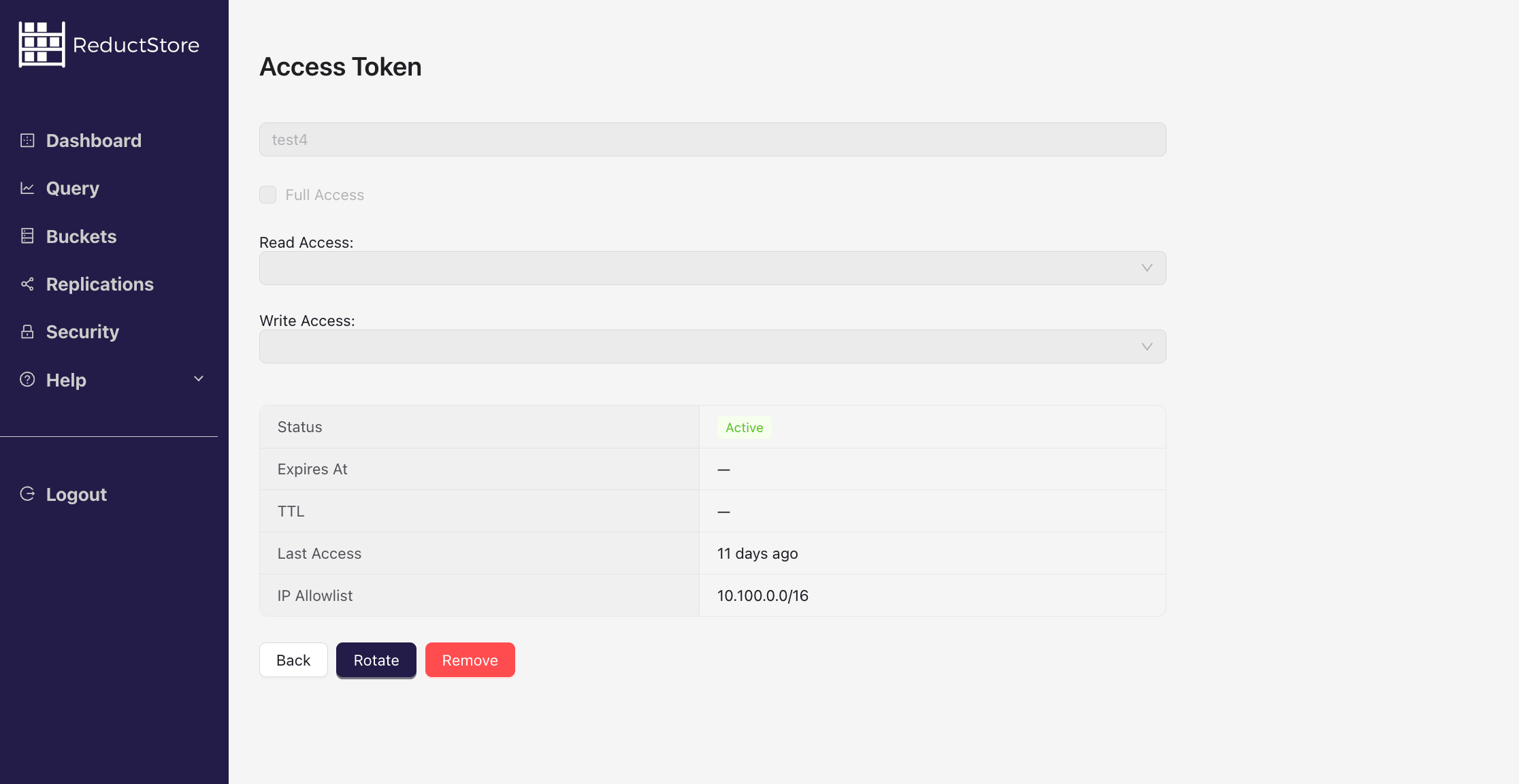
- Click on the "Remove" button to delete the token.
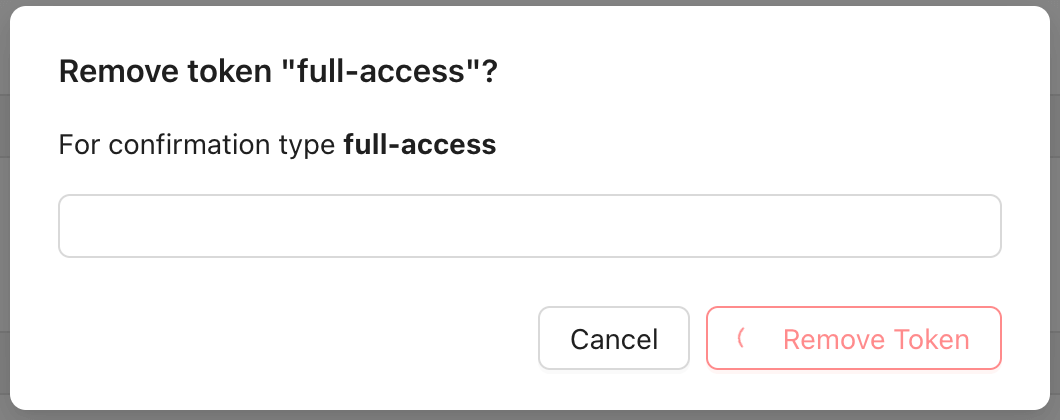
- Confirm the action by typing the token name and clicking on the "Remove" button.
from reduct import Client, Permissions


async def remove_token():
    # Create a client with the base URL and API token
    async with Client("http://localhost:8383", api_token="my-token") as client:
        # Remove the token with the name "token-to-remove"
        await client.remove_token("token-to-remove")


if __name__ == "__main__":
    import asyncio

    asyncio.run(remove_token())
import { Client } from "reduct-js";

// Create a new client with the server URL and an API token
const client = new Client("http://127.0.0.1:8383", { apiToken: "my-token" });

// Remove the token "token-to-remove"
await client.deleteToken("token-to-remove");
package main

import (
	"context"
	reduct "github.com/reductstore/reduct-go"
)

func main() {
	// Create a client and use the base URL and API token
	client := reduct.NewClient("http://localhost:8383", reduct.ClientOptions{
		APIToken: "my-token",
	})

	// Remove the token with the name "token-to-remove"
	err := client.RemoveToken(context.Background(), "token-to-remove")
	if err != nil {
		panic(err)
	}

}
use reduct_rs::{ReductClient, ReductError};
use tokio;

#[tokio::main]
async fn main() -> Result<(), ReductError> {
    // Create a new client with the API URL and API token
    let client = ReductClient::builder()
        .url("http://127.0.0.1:8383")
        .api_token("my-token")
        .build();

    // Remove the token "token-to-remove"
    client.delete_token("token-to-remove").await?;
    Ok(())
}
#include <reduct/client.h>
#include <iostream>
#include <cassert>

using reduct::IBucket;
using reduct::IClient;
using reduct::Error;

std::string PrintTime(std::chrono::system_clock::time_point time) {
    auto now_time_t = std::chrono::system_clock::to_time_t(time);
    auto now_tm = std::localtime(&now_time_t);
    char buf[32];
    std::strftime(buf, sizeof(buf), "%Y-%m-%d %H:%M:%S", now_tm);
    return buf;
}

int main() {
    // Create a client with the server URL
    auto client = IClient::Build("http://127.0.0.1:8383", {
            .api_token = "my-token"
    });

    // Create a token with read/write access to the bucket "example-bucket"
    auto [token, create_err] = client->CreateToken("new-token", {
            .full_access = true,
            .read = {"example-bucket"},
            .write = {"example-bucket"},
    });
    return 0;
}
#!/bin/bash
set -e -x

API_PATH="http://127.0.0.1:8383/api/v1"
AUTH_HEADER="Authorization: Bearer my-token"

# Remove token
curl -X DELETE -H "$AUTH_HEADER" "$API_PATH/tokens/token-to-remove"
Audit Log
ReductStore provides an audit log that records HTTP API requests, including successful and failed requests.
Audit log records are stored in the $system bucket under the audit/<instance>/<token-name> entry. For example, audit records for token init-token on instance reductstore are stored in $system/audit/reductstore/init-token.
API audit logs are written as api_call system events. The stored JSON record contains these fields:
| Field | Description |
|---|---|
timestamp | Event timestamp in Unix microseconds. |
instance | ReductStore instance name that emitted the audit record. |
status | HTTP response status code for the aggregated API calls. |
message | Error message for failed calls, or an empty string on success. |
token_name | Token name used for the API calls. |
method | HTTP method. |
path | HTTP API path. |
client_ip | Client IP address, or null when the client IP is unavailable. |
call_count | Number of matching API calls aggregated into this record. |
duration | Total duration in seconds for the aggregated API calls. |
The record also has a status label with the same value as the status field, so you can filter audit logs by result code. Consecutive API calls with the same instance, token, method, path, status, message, and client IP are aggregated and flushed when the aggregation window becomes idle or reaches its time cap.
Example:
{
  "timestamp": 1775270571819933,
  "instance": "reductstore",
  "token_name": "init-token",
  "method": "POST",
  "path": "/api/v1/io/ros_data/write",
  "status": 200,
  "message": "",
  "client_ip": "10.100.99.1",
  "call_count": 762,
  "duration": 59.03624846999997
}
Audit logging is controlled by the RS_SYSTEM_EVENTS_ENABLED environment variable and enabled by default.
Read-only Replica Behavior
Read-only replicas do not have write access. Instead, they forward audit logs to a primary or secondary instance.
To enable auditing on a read-only replica, configure:
RS_PRIMARY_URL(required)RS_SECONDARY_URL(optional, for failover)
To access the audit log, the relevant token must include exact permissions for the $system bucket, either for reading or writing (wildcards do not apply to system buckets).
Zenoh API operations are not currently recorded in the audit log (you will not see Zenoh calls in $system/audit).